
25 BYD Sealion 7 Tips and Tricks Every Owner Should Know

The BYD Sealion 7 is an advanced electric SUV that combines impressive performance, modern technology, intelligent safety systems and a spacious interior. However, many owners are unaware of some of the most useful features available in their vehicles.
Whether you have purchased the BYD Sealion 7 Premium or Performance in Australia, understanding its settings and capabilities can significantly improve your ownership experience.
From hidden touchscreen gestures and battery charging recommendations to energy-saving techniques and smartphone connectivity, there are plenty of ways to get more from this electric SUV.
In this guide, we explore the 25 best BYD Sealion 7 tips and tricks to help you maximise driving range, reduce charging costs and enjoy greater comfort.
- Best BYD Sealion 7 Tips and Tricks at a Glance
- 1. Use the Three-Finger Touchscreen Climate Control Trick
- 2. Use the Hidden Touchscreen Shortcut Menu
- 3. Activate Eco Mode for Everyday Driving
- 4. Adjust the Regenerative Braking Settings
- 5. Charge Your BYD Sealion 7 to 100% Regularly
- 6. Avoid Leaving the Battery Nearly Empty
- 7. Schedule Charging During Off-Peak Electricity Hours
- 8. Use the BYD App to Control Your Vehicle Remotely
- 9. Pre-Cool the Cabin Before Driving
- 10. Use the Ventilated and Heated Seats
- 11. Activate Auto Hold in Heavy Traffic
- 12. Use the NFC Key Card as a Backup
- 13. Set Up Your Smartphone Digital Key
- 14. Learn the Hi BYD Voice Commands
- 15. Use the 360-Degree Camera When Parking
- 16. Monitor Your Tyre Pressure Regularly
- 17. Avoid Unnecessary Hard Acceleration
- 18. Reduce Motorway Speeds When Appropriate
- 19. Monitor Energy Consumption Instead of Estimated Range
- 20. Use DC Fast Charging Strategically
- 21. Use Vehicle-to-Load for Camping and Outdoor Activities
- 22. Make Better Use of the Front Boot
- 23. Install Over-the-Air Software Updates
- 24. Restart the Infotainment System if It Freezes
- 25. Prepare Your Sealion 7 for Extended Storage
- Best BYD Sealion 7 Settings for Daily Driving
- Common BYD Sealion 7 Ownership Mistakes to Avoid
- BYD Sealion 7 Tips for Long-Distance Driving in Australia
- Frequently Asked Questions
- Conclusion
Best BYD Sealion 7 Tips and Tricks at a Glance
| Tip | Main benefit |
|---|---|
| Use three-finger touchscreen gestures | Easier climate control |
| Activate Eco mode | Smoother, more efficient driving |
| Adjust regenerative braking | Improved energy recovery |
| Charge to 100% regularly | Battery balancing |
| Schedule overnight charging | Lower electricity costs |
| Use the BYD smartphone app | Remote vehicle control |
| Activate Auto Hold | Greater driving comfort |
| Use the NFC key card | Convenient vehicle access |
| Pre-cool the cabin | Improved comfort |
| Use Vehicle-to-Load | Power external appliances |
| Monitor tyre pressure | Better efficiency |
| Install software updates | Improved functionality |
Feature availability and menu names may vary depending on your model year, equipment and software version.
1. Use the Three-Finger Touchscreen Climate Control Trick
One of the most useful hidden features of the BYD Sealion 7 is its three-finger touchscreen gesture control.
Instead of opening the climate control menu every time you want to adjust the air conditioning, you can use the following gestures:
- Swipe up with three fingers to increase the temperature.
- Swipe down with three fingers to reduce the temperature.
- Swipe horizontally with three fingers to adjust the fan speed.
This feature makes climate adjustments considerably more convenient.
We recommend familiarising yourself with these gestures while parked before using them during everyday driving.
The 15.6-inch infotainment touchscreen provides quick access to frequently used vehicle functions.
Swiping down from the top of the display opens the shortcut menu, while swiping upwards from the bottom provides access to task management.
Learning these shortcuts can reduce the time spent navigating multiple menus.
Depending on your software version, shortcuts may provide access to connectivity, display and vehicle settings.
3. Activate Eco Mode for Everyday Driving
The BYD Sealion 7 offers different driving modes designed to suit various road conditions and driving preferences.
Eco mode is particularly useful for everyday commuting.
Benefits of Eco Mode
- Smoother acceleration.
- More progressive accelerator response.
- Easier management of electricity consumption.
- Comfortable urban driving.
- Potentially improved driving range.
Although Sport mode delivers a more responsive driving experience, Eco mode is generally better suited to congested Australian city roads.
However, your driving habits remain more important than the selected mode when determining overall energy consumption.
4. Adjust the Regenerative Braking Settings
Regenerative braking allows the Sealion 7 to recover some energy when slowing down.
The vehicle offers different energy recovery settings.
| Regenerative braking setting | Best suited for |
|---|---|
| Standard | Motorway driving and smoother coasting |
| High | Urban driving and frequent deceleration |
Higher regeneration can be particularly convenient in stop-start traffic.
However, maintaining momentum when appropriate is often more efficient than repeatedly accelerating and recovering energy through braking.
Remember that regenerative braking does not eliminate the need to use the brake pedal.
5. Charge Your BYD Sealion 7 to 100% Regularly
Unlike many electric vehicles equipped with nickel-based batteries, the BYD Sealion 7 uses a lithium iron phosphate Blade Battery.
The manufacturer's charging recommendations are therefore different from the common advice to always limit an electric vehicle to 80%.
BYD's 2025 Sealion 7 owner's handbook recommends fully charging the battery at least once per week.
Regular full charging helps the battery management system maintain accurate charge estimates and supports battery balancing.
For extended storage, however, the recommendations are different.
6. Avoid Leaving the Battery Nearly Empty
Although the Blade Battery is designed for everyday electric vehicle use, leaving it at an extremely low charge level for prolonged periods is not recommended.
We suggest maintaining a reasonable charge reserve, particularly when travelling through regional Australia.
Avoid arriving home with almost no battery remaining if you cannot recharge immediately.
This also provides flexibility if unexpected journeys arise.
7. Schedule Charging During Off-Peak Electricity Hours
One of the best BYD Sealion 7 charging tricks is to take advantage of scheduled charging.
Many Australian electricity providers offer cheaper overnight rates or dedicated electric vehicle tariffs.
The vehicle's smart charging settings allow owners to select preferred charging periods.
This content may interest you!
How to benefit from scheduled charging
- Check your electricity provider's off-peak hours.
- Open the vehicle's smart charging settings.
- Configure your preferred charging period.
- Connect the charging cable.
- Confirm that the schedule is active.
If your wall charger also has scheduling functionality, ensure that its timer does not conflict with the vehicle's charging schedule.
8. Use the BYD App to Control Your Vehicle Remotely
The BYD smartphone app is one of the most convenient tools for Sealion 7 owners.
Depending on vehicle connectivity and supported features, the application allows you to perform several functions remotely.
These may include checking the battery level, monitoring charging progress, checking vehicle status, controlling door locks and adjusting cabin temperature.
This is especially useful when your vehicle is parked outside during Australia's hot summer months.
We recommend setting up the application as soon as you receive your vehicle.
9. Pre-Cool the Cabin Before Driving
During summer, the interior of a parked vehicle can become extremely hot.
Instead of entering an uncomfortable cabin and immediately running the air conditioning at maximum power, use the remote climate control function before departure.
When supported by your charging setup, preconditioning while connected to external power can help preserve battery charge for driving.
This is particularly useful in cities such as Brisbane, Perth, Sydney and Adelaide.
10. Use the Ventilated and Heated Seats
The BYD Sealion 7 offers heated and ventilated front seats, providing additional comfort throughout the year.
Seat ventilation is particularly useful during hot weather, while seat heating can make winter driving more comfortable.
Using localised seat heating may also reduce the need to heat the entire cabin aggressively during colder weather.
The energy-saving benefit depends on your climate settings and driving conditions.
11. Activate Auto Hold in Heavy Traffic
Auto Hold is a useful feature for drivers who frequently encounter traffic congestion.
Once activated and the required operating conditions are met, the system can hold the vehicle stationary after you release the brake pedal.
This makes waiting at traffic lights and navigating congested roads more comfortable.
When you are ready to move, applying the accelerator normally releases the hold.
Auto Hold is not a substitute for the parking brake when leaving the vehicle.
12. Use the NFC Key Card as a Backup
The Sealion 7 supports NFC card access, providing an alternative to the traditional smart key.
The card is particularly useful when you want to avoid carrying a bulky key fob.
We recommend keeping the NFC card available as a backup when travelling.
Avoid leaving the card inside the vehicle or placing it directly on the wireless phone charging pad.
You should also familiarise yourself with the emergency mechanical key procedure in case the vehicle experiences a low-voltage battery problem.
13. Set Up Your Smartphone Digital Key
Compatible smartphones can offer another convenient way to access the BYD Sealion 7.
Digital key functionality depends on your phone model, operating system, vehicle software and regional support.
Once configured, it may allow you to access and operate the vehicle without carrying the traditional key fob.
We recommend testing the digital key at home before relying on it during longer journeys.
Always carry an alternative means of accessing the vehicle when travelling to remote locations.
14. Learn the Hi BYD Voice Commands
The Sealion 7 features an intelligent voice assistant that can reduce the need to interact manually with the touchscreen.
Simply activate the assistant using the wake phrase Hi BYD and try requesting supported functions.
Useful commands may include asking the vehicle to adjust the temperature, change the fan speed, control music or open charging settings.
Available commands can vary between software versions.
Voice controls are particularly helpful when you want to make simple adjustments without looking away from the road.
This content may interest you!
15. Use the 360-Degree Camera When Parking
The BYD Sealion 7 is a relatively large electric SUV, making its surround-view camera system particularly useful.
The camera provides additional visibility when parking in tight spaces, navigating narrow driveways or approaching kerbs.
It can also help protect the alloy wheels from accidental damage.
This is especially relevant for the Performance model, which features larger 20-inch wheels.
Nevertheless, always check your mirrors and surroundings directly because cameras have limitations and blind spots.
16. Monitor Your Tyre Pressure Regularly
Correct tyre pressure is essential for electric vehicle efficiency, handling and tyre longevity.
Underinflated tyres increase rolling resistance, which can reduce driving range.
The Sealion 7 features a tyre pressure monitoring system that helps owners identify pressure changes.
Tips for maintaining correct tyre pressure
Check the pressures when the tyres are cold, follow the manufacturer's pressure label and adjust according to the specified load conditions.
Do not inflate the tyres beyond the recommended pressure simply to improve range.
Maintaining correct tyre pressure is one of the simplest and most effective ownership habits.
17. Avoid Unnecessary Hard Acceleration
The BYD Sealion 7 delivers impressive acceleration, particularly in Performance specification.
| Specification | Premium | Performance |
|---|---|---|
| Drivetrain | RWD | AWD |
| Maximum power | 230 kW | 390 kW |
| 0–100 km/h | 6.7 seconds | 4.5 seconds |
| WLTP range | 482 km | 456 km |
However, repeatedly using maximum acceleration increases energy consumption and can accelerate tyre wear.
Smooth acceleration is generally more efficient and comfortable for passengers.
We recommend saving Sport mode and more responsive acceleration for situations where they are appropriate.
18. Reduce Motorway Speeds When Appropriate
Electric vehicles generally consume more energy at higher speeds because aerodynamic resistance increases significantly.
If you are travelling between Australian cities, maintaining a moderate and consistent speed within legal limits can improve efficiency.
Avoid unnecessary acceleration and frequent speed changes.
This can make a noticeable difference on longer motorway journeys, particularly when travelling against strong headwinds.
19. Monitor Energy Consumption Instead of Estimated Range
The remaining range displayed on the dashboard is useful, but it should not be your only reference.
Monitoring electricity consumption in kWh/100 km provides a better understanding of how efficiently you are driving.
Illustrative BYD Sealion 7 driving range
Using an approximately 82.56 kWh battery capacity for a theoretical calculation:
| Energy consumption | Theoretical range |
|---|---|
| 16 kWh/100 km | 516 km |
| 18 kWh/100 km | 459 km |
| 20 kWh/100 km | 413 km |
| 22 kWh/100 km | 375 km |
| 25 kWh/100 km | 330 km |
These figures are illustrative calculations rather than guaranteed real-world driving distances. Usable battery capacity, weather, vehicle load and battery reserves affect the actual range.
20. Use DC Fast Charging Strategically
The Australian BYD Sealion 7 specifications include DC fast charging capability of up to 150 kW.
However, the vehicle will not maintain maximum charging power throughout the entire session.
Charging typically becomes slower as the battery approaches full capacity.
Best fast charging habits
For road trips, charging to approximately 80% can be more time-efficient when sufficient range remains to reach your next destination.
Charging after driving may also be beneficial when the battery is at a suitable operating temperature.
Remember to follow BYD's regular full-charging recommendations when practical, rather than treating 80% as a permanent charging limit.
21. Use Vehicle-to-Load for Camping and Outdoor Activities
Vehicle-to-Load, commonly known as V2L, is one of the most practical features of the BYD Sealion 7.
It allows the vehicle's high-voltage battery to supply electricity to compatible external devices through an appropriate adapter.
What can you power with V2L?
Suitable appliances may include camping refrigerators, laptops, portable lighting, fans, small cooking appliances and compatible electronic equipment.
Always check the combined power requirements of connected devices against the adapter and vehicle's rated output.
V2L is particularly useful for camping trips, outdoor activities and temporary power requirements.
This content may interest you!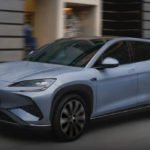 BYD Sealion 7 Charge Time: How Long Does It Take to Charge?
It should never be connected directly to household wiring without an approved electrical installation.
22. Make Better Use of the Front Boot
The BYD Sealion 7 offers a 58-litre front storage compartment, commonly called a frunk.
This additional storage area is particularly useful for charging cables, cleaning accessories and other suitable items.
| Storage compartment | Capacity |
|---|---|
| Front boot | 58 litres |
| Rear boot | 500 litres |
| Combined nominal capacity | 558 litres |
Keeping charging accessories in the front boot can make them easier to access when the rear luggage compartment is full.
Follow the manufacturer's storage weight limits.
23. Install Over-the-Air Software Updates
The Sealion 7 supports over-the-air software updates, commonly called OTA updates.
These updates may introduce improvements to infotainment functionality, connectivity, system stability and vehicle features.
You can generally check for available updates through the system version section of the infotainment settings.
Schedule installations when you do not need to use the vehicle and follow the instructions displayed on the touchscreen.
24. Restart the Infotainment System if It Freezes
If the central touchscreen becomes unresponsive, a system restart may resolve temporary software problems.
While safely parked, press and hold the infotainment volume scroll button for approximately three seconds to restart the system.
This may help resolve temporary display issues, audio glitches or connectivity problems.
A restart is different from a factory reset and should not normally erase your personal settings.
If the problem continues or affects important driving information, contact an authorised BYD service centre.
25. Prepare Your Sealion 7 for Extended Storage
If you are planning to leave your electric SUV unused for an extended period, avoid storing it with an extremely high or low battery charge.
For periods exceeding seven days, the 2025 owner's handbook recommends maintaining a charge level between 40% and 60%.
Longer storage periods require additional battery maintenance according to the owner's handbook.
This is particularly important if you are travelling overseas or leaving your vehicle parked for several weeks.
Best BYD Sealion 7 Settings for Daily Driving
The following settings provide a useful starting point for everyday ownership.
| Feature | Suggested setting |
|---|---|
| Driving mode | Eco or Normal |
| Regenerative braking | High in urban traffic |
| Motorway regeneration | Standard |
| Auto Hold | According to preference |
| Climate control | Automatic, around 22–24°C |
| Home charging | Off-peak schedule |
| Battery full charging | At least weekly |
| Safety assistance | Enabled |
| Software updates | Install when available |
| Tyre pressure | Manufacturer's recommendation |
These settings are not mandatory. The best configuration depends on your driving style, weather conditions and personal preferences.
Common BYD Sealion 7 Ownership Mistakes to Avoid
Even experienced electric vehicle owners can develop habits that negatively affect efficiency or convenience.
Some common mistakes include:
- Ignoring tyre pressure warnings.
- Leaving the battery nearly empty for extended periods.
- Expecting maximum DC charging speed throughout every session.
- Using aggressive acceleration unnecessarily.
- Ignoring software updates.
- Relying entirely on the displayed driving range.
- Neglecting scheduled servicing.
- Leaving the vehicle fully charged for extended storage.
- Relying exclusively on a smartphone for vehicle access.
- Assuming driver assistance systems can replace attentive driving.
Avoiding these mistakes can help improve your overall ownership experience.
BYD Sealion 7 Tips for Long-Distance Driving in Australia
Australia's extensive road network makes preparation particularly important when travelling in an electric vehicle.
Before starting a long journey, we recommend identifying suitable charging stations, checking their connector compatibility and confirming their operating status.
Allow an additional battery reserve when travelling through remote areas, especially during extreme temperatures or when carrying heavy luggage.
Strong winds, mountainous roads and higher motorway speeds can increase electricity consumption.
Planning charging stops in advance will make long-distance travel considerably more convenient.
Frequently Asked Questions
Some of the most useful features include three-finger climate control gestures, touchscreen shortcuts, remote cabin preconditioning, NFC key access, voice commands and scheduled charging.
Should I charge my BYD Sealion 7 to 100%?
Yes. BYD's 2025 owner's handbook recommends fully charging the Blade Battery at least once per week. However, a lower charge level is recommended for extended vehicle storage.
How can I improve my BYD Sealion 7 driving range?
You can improve driving range by accelerating smoothly, maintaining correct tyre pressure, avoiding unnecessary motorway speed increases, managing climate control efficiently and reducing unnecessary vehicle weight.
Does the BYD Sealion 7 have one-pedal driving?
The Sealion 7 offers adjustable regenerative braking, including a higher energy recovery setting. However, this should not be confused with a full one-pedal driving system that consistently brings the vehicle to a complete stop.
Can the BYD Sealion 7 power electrical appliances?
Yes. The Sealion 7 supports Vehicle-to-Load technology, allowing compatible external appliances to receive electricity from the vehicle's battery through a suitable adapter.
Conclusion
The BYD Sealion 7 offers much more than impressive acceleration, competitive electric driving range and modern styling. Its intelligent software, practical charging features and advanced comfort systems make it a versatile electric SUV for Australian drivers.
This content may interest you!BYD Sealion 7 Boot Space: Capacity, Dimensions and PracticalityBy learning the hidden touchscreen gestures, optimising regenerative braking, maintaining the Blade Battery correctly and taking advantage of scheduled charging, owners can enjoy a more efficient and convenient driving experience.
Among the best BYD Sealion 7 tips and tricks, we particularly recommend mastering the voice assistant, using remote climate control, monitoring energy consumption and following the manufacturer's battery charging recommendations.
Whether you drive the Premium or Performance version, these simple habits can help you get the most out of your BYD Sealion 7.
Leave a Reply