Ford Ranger dashboard symbols tell us when a system needs attention, a driving mode is engaged or a safety feature is operating. To understand a warning, we need the symbol, its color, whether it flashes and the message beside it. An oil can, a wrench and a 4H indicator each call for a different response.
This illustrated guide covers the main engine, brake, tire, diesel, four-wheel-drive and driver-assistance indicators. We explain what each symbol means and the practical next step, including which warnings mean we should stop safely and which simply confirm a selected feature.
Coverage: common symbols documented in Ford’s 2024 Ranger manuals for U.S. and selected international models. Engines, equipment and displays vary by year and market. Diesel information applies only to diesel Rangers; some off-road features are optional or Raptor-specific. Plug-in hybrid warnings are outside this guide. Images come from Ford’s symbol glossary; the exact appearance and color on your instrument cluster may differ.
Identify the symbol immediately. Stop for oil pressure, overheating or serious braking problems.
Amber or yellow
Fault, limitation or attention needed
Read the message and arrange the appropriate checks.
Green or white
Feature selected, available or operating
Confirm the selected function suits the conditions.
Blue
Main-beam headlamps
Check whether we might dazzle other road users.
Flashing
Operation, a pending change or a fault
Interpret it according to the specific symbol.
Color gives us a starting point, not a diagnosis. A red seat-belt reminder differs from a red oil-pressure warning, while a flashing engine light can be more urgent than a steady amber lamp. Follow any instruction to stop safely even if the icon looks unfamiliar.
Why warning lights appear when we switch on the ignition
Several lamps illuminate briefly during the startup check. Battery charging and oil-pressure lamps may remain visible before the engine starts; the parking-brake indicator remains while the brake is applied. This does not automatically mean the truck has several faults.
Pay attention when a lamp fails to follow its normal startup sequence, remains after starting or appears while driving. Once safely parked, record the exact wording, color and flashing pattern. That information helps a workshop distinguish an electrical fault from an operating limitation or an active feature.
Red warnings and essential safety reminders
Engine oil pressure warning
Oil can — stop safely and switch off the engine.This warning concerns engine oil pressure. It is not a routine oil-change reminder. If it illuminates with the engine running, we should pull over safely and stop the engine to avoid damage from inadequate lubrication.Check the oil level using the handbook procedure when it is safe to do so. A normal level does not prove that pressure is adequate. Do not keep driving or repeatedly restart the engine to see whether the warning clears; obtain assistance if the cause remains unresolved.
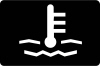
Engine coolant temperature warning
Thermometer — excessive coolant temperature.An illuminated coolant-temperature warning can indicate overheating. Stop safely, switch off the engine and follow the Ranger’s overheating instructions. Loss of power, steam or a rising temperature gauge makes prompt action especially important.Let the cooling system cool before inspecting it. Never remove a pressurized coolant cap while the engine is hot. Towing, a coolant leak or a cooling-system problem can contribute, but the lamp alone does not identify the cause. Arrange recovery if the truck cannot be operated safely.
Brake system warning
Brake symbol — parking brake, fluid level or brake-system fault.This lamp can appear when the parking brake is applied. If it remains after we fully release the brake, or appears during driving, it may indicate low brake fluid or a braking-system fault. Check the accompanying message.Stop safely if the pedal feels unusual, stopping performance changes or another brake warning appears. Do not assume topping up fluid solves the problem: a leak or worn components may need attention. Arrange inspection before continuing when braking safety is uncertain.
Battery and charging-system warning
Battery symbol — charging-system concern.A battery symbol while the engine is running generally points to a charging-system problem. It does not simply tell us that the battery needs replacing. The alternator, wiring or other components may be involved.Switch off unnecessary electrical accessories and seek prompt assistance. Remaining battery power is limited, so a running engine is no guarantee that the truck will keep operating. Stop in a safe location if the vehicle develops additional faults or instructions require it; do not touch rotating engine components during checks.
Airbag and restraint-system warning
Seated person and circle — restraint-system fault.If the airbag lamp stays on, flashes unexpectedly or does not behave as described during its startup check, the restraint system requires inspection. Airbags or related protection may not function as intended in a collision.We should arrange a qualified diagnosis promptly. This lamp is different from a passenger-airbag status indicator, which may explain a deliberate activation state. Do not probe airbag wiring or try to clear the light by disconnecting components beneath the seats.
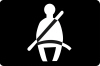
Seat-belt reminder
Belted occupant — check occupied seats.This reminder asks us to fasten the relevant seat belt. Depending on equipment, the display may identify a particular seating position or show rear-seat belt status. Secure everyone before moving.If an object placed on a seat triggers the reminder, move it to a suitable secured storage location. If the warning remains with the belt correctly fastened, investigate the buckle or sensing system. Using a dummy buckle removes a warning without providing protection.
Door ajar warning
Open-door symbol — a closure is not secure.An open-door indication means a monitored door or closure is not fully shut. Read the display to identify the location, then stop safely before checking it. A door that looks closed may still not be properly latched.Close it firmly and confirm that the warning disappears. If it persists, the latch or its sensor may require attention. Do not reach across the cabin or attempt to open and reclose a door while the truck is moving.
Engine, braking and tire warning symbols
Check engine light
Engine outline — engine or emissions-control fault.A steady check engine light means the engine-management system has detected a fault. We should arrange diagnosis, even when the Ranger seems to drive normally. The symbol does not identify a specific part to replace.Flashing can indicate a misfire that may damage the catalytic converter. Reduce load, avoid hard acceleration and deceleration, and obtain immediate service guidance. If the engine runs roughly, loses significant power or another urgent warning appears, stop safely. Read diagnostic codes before attempting to erase the warning.
Powertrain or wrench warning
Wrench — powertrain or four-wheel-drive fault.The wrench symbol can indicate a non-emissions powertrain or four-wheel-drive fault. It is not simply a reminder to change the oil. A message may describe reduced power, a drivetrain limitation or a required service action.If the wrench and check engine light appear together, follow Ford’s instruction to stop as soon as it is safe and seek assistance. Avoid towing or demanding off-road driving with an unresolved drivetrain warning. A restart may change the display without fixing the underlying problem.
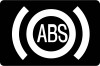
ABS warning light
ABS — anti-lock braking fault.An ABS warning indicates a fault in the anti-lock braking system. Conventional braking may remain available when this is the only brake-related warning, but anti-lock assistance may not function during hard braking.Allow more space and arrange prompt service. If the red brake warning also appears, the pedal feels abnormal or stopping performance changes, stop safely and seek assistance. We should not assume an ABS warning is harmless just because ordinary light braking still feels normal.
Tire pressure monitoring warning
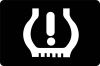
Tire and exclamation mark — pressure loss or TPMS fault.A steady tire-pressure lamp usually means one or more tires need attention. Stop somewhere safe, check for damage and measure pressures with a gauge. Use the cold pressures on the vehicle label for its tires and load requirements.Flashing followed by steady illumination can indicate a monitoring-system fault. Do not use the tire sidewall maximum as the target pressure. After correcting pressures, follow the handbook’s update or reset process; never reset the system merely to hide an unresolved puncture.
Stability and traction-control activity
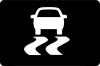
Skidding vehicle — intervention or system fault.A flashing stability-control indication commonly means the system is intervening to help manage traction or directional stability. Ease off the accelerator and adapt speed to the surface rather than trying to overpower the intervention.A lamp that stays illuminated can indicate a fault, depending on the associated message and selected settings. Have a persistent fault checked. Electronic assistance cannot create grip that the tires and surface do not provide, especially when towing or carrying a heavy load.
Stability control off indicator
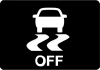
Skidding vehicle with OFF — assistance switched off or restricted.This indicator shows that a stability-related function has been switched off or limited. Some off-road modes alter the available assistance, so we should check the selected mode before assuming a failure.Restore the normal road setting when the special condition has passed. If the lamp remains after the expected settings are restored, read the display and arrange inspection. The OFF symbol and the system’s active-intervention symbol convey different information, even though both depict a skidding vehicle.
Diesel Ford Ranger warning lights
Diesel Rangers have additional fuel and emissions systems that petrol versions do not share. Identify the engine and market before applying these meanings. Exhaust-filter messages, water-in-fuel warnings and AdBlue information require different actions; they are not interchangeable diesel service reminders.
Glow plug and diesel preheat indicator
Coil — diesel starting preparation.The coil normally indicates that diesel preheating is taking place. Follow the starting sequence for the vehicle and wait for the indicator to go out when instructed before cranking the engine. The period can vary with conditions.If the indicator persists unexpectedly or appears with a fault message during driving, consult the exact handbook and arrange diagnosis. We should not interpret every coil appearance as failed glow plugs, nor assume a warning while driving is simply normal cold-start preparation.
Water in fuel warning
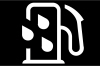
Fuel-system water indicator — service the water separator.This symbol indicates water or moisture detected in the diesel fuel system. Water contamination can damage fuel-system components, so arrange prompt attention and follow the vehicle’s instructions for the fuel-filter water trap.Never drain the separator while the engine is running. If we are unfamiliar with the procedure, use a qualified workshop rather than improvising around the fuel system. Repeated warnings after servicing warrant further investigation, including possible fuel contamination. This is not the same as the low-fuel warning.
Diesel exhaust fluid or AdBlue warning
DEF indicator — fluid level or selective-catalytic-reduction issue.Read the message to distinguish a low diesel exhaust fluid level from a system malfunction. A low-level warning requires the correct fluid in the dedicated DEF tank; a fault may need diagnosis rather than another refill.Follow any distance countdown and refill instructions promptly because the system can impose operating or restart restrictions. Never add AdBlue to the diesel fuel tank. Required quantities and recognition procedures vary, so use the handbook for the specific Ranger rather than a universal refill amount.
Exhaust filter regeneration disabled indicator
Filter indicator — regeneration is disabled.Ford’s glossary identifies this symbol as exhaust filter regeneration disabled. It does not by itself mean the diesel particulate filter needs replacing. Read any related exhaust-filter message to establish whether regeneration has been disabled, is required or needs workshop attention.Follow the precise procedure for the vehicle. Do not invent a motorway speed, time limit or stationary regeneration routine. Exhaust temperatures can become very high during regeneration, so keep the truck clear of combustible material and follow all location and operating restrictions.
Ford Ranger 4WD and differential-lock symbols
A selected drive-mode indicator is normally a status display, not a mechanical warning. In the covered Ranger documentation, a steady 4WD mode indicator confirms that the requested mode has been achieved. During a transition, follow the on-screen instructions and do not assume engagement is complete. Transfer-case options differ; not every Ranger has 4A.
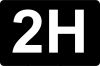
2H: two-wheel-drive high range
2H — normal two-wheel-drive mode.The 2H indicator identifies two-wheel-drive high range. On the covered system, it can illuminate briefly when the mode is selected. It is a normal operating indication rather than an alert that four-wheel drive has failed.Use the mode according to the handbook and road conditions. If another message says a requested shift cannot be completed, follow that message instead of repeatedly operating the selector. A status icon does not replace the instructions for changing modes while moving or stationary.
4H: four-wheel-drive high range
4H — high-range four-wheel drive engaged.The 4H indicator confirms high-range four-wheel drive when the shift is complete. This mode is intended for suitable low-grip conditions where the additional traction is appropriate. Its presence alone does not indicate a fault.Do not use a locked four-wheel-drive mode on dry, high-grip pavement where Ford prohibits it. Driveline binding and damage can result. If steering feels tight after leaving a loose surface, stop safely and check the selected mode and the handbook’s disengagement procedure.
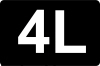
4L: four-wheel-drive low range
4L — low-range four-wheel drive engaged.Low range provides gearing suited to demanding low-speed terrain. The 4L symbol indicates that this range is selected; it is not a low-fluid warning. Normal road driving calls for the appropriate road mode instead.Changing into or out of low range has specific speed, gear-position and braking requirements. Follow the instructions for the particular transmission and transfer case. Do not force the selector or assume a flashing indication means the shift has finished. Confirm completion before entering difficult terrain.
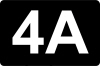
4A: automatic four-wheel drive
4A — automatic four-wheel drive, where fitted.On Rangers equipped with this mode, 4A automatically manages drive distribution as conditions require. It is distinct from 4H and 4L and can be intended for changing road conditions within the handbook’s operating limits.The 4A indicator normally confirms selection rather than a fault. Do not apply 4A guidance to a truck with only 2H, 4H and 4L. If the display reports that four-wheel drive is unavailable, acknowledge the limitation and arrange diagnosis when the condition does not resolve as instructed.
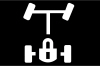
Rear electronic differential lock
Axle and lock — rear differential locking status.This indicator relates to the rear electronic locking differential, where fitted. The feature helps in particular low-traction situations by changing how the rear wheels can rotate relative to each other. It is not a general-purpose setting for ordinary cornering.Engagement depends on operating conditions and model-specific limits. Read any pending or unavailable message before relying on the lock. Equipped Raptor versions may also have a separate front-lock indication; the two axles are not interchangeable. Follow the exact mode and speed restrictions in the handbook.
Driver-assistance and convenience indicators
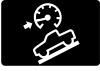
Hill descent control
Vehicle on a slope — descent assistance.The hill descent indicator relates to the feature that helps control speed on suitable descents. It normally describes a selected or operating function, not an engine problem. Availability depends on the vehicle’s equipment and operating conditions.We remain responsible for steering, braking and choosing a safe path. A message stating that the system is unavailable or needs to cool changes what assistance we can expect. Do not enter a difficult descent relying on a feature that has not confirmed it is available.
Auto Hold indicator
Auto Hold — brake-holding function.Auto Hold can maintain braking after the vehicle stops when its operating conditions are met. Its indicators distinguish the feature’s state; an enabled function is not always actively holding the vehicle. Confirm the display before easing pressure on the pedal.Auto Hold does not replace the parking procedure. Before leaving the Ranger, select the appropriate transmission position and apply the parking brake as instructed. If the display reports an Auto Hold fault, use the brake pedal normally and have the system checked.
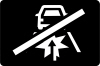
Pre-Collision Assist unavailable
Collision-assistance indicator — protection limited or unavailable.This indicator tells us that a collision-assistance function is unavailable or restricted. The message may identify an obstruction, environmental limitation or system fault. It does not mean the vehicle is automatically safe from a collision.Keep a safe following distance and control braking ourselves. When parked, check the relevant camera or sensor areas for dirt, ice or obstruction using the handbook’s guidance. Persistent warnings need inspection. Cleaning a sensor cannot resolve every fault, and assistance can remain limited in difficult weather.
Lane-keeping assistance indicator
Lane markings — lane-assistance status.Lane-assistance graphics can indicate selection, detected lane markings or intervention. Interpret their color and accompanying display using the specific cluster’s instructions; the same lane outline does not have one universal warning meaning.Keep our hands on the wheel and continue monitoring the road. Poor markings, weather or a blocked camera can limit operation. If a malfunction message remains under suitable conditions, arrange service. A selected lane feature does not turn the Ranger into a self-driving vehicle.
Blind Spot Information System off or unavailable
BLIS status — blind-spot assistance limited.This dashboard indication relates to blind-spot assistance being switched off or unavailable. It is different from a mirror warning that alerts us to a vehicle in the monitored area. Read the display to identify the reason.Continue using mirrors and direct checks before changing lanes. Trailer configurations, obstructions or system faults can affect assistance depending on equipment. Verify the towing settings in the handbook, and seek service for a persistent malfunction instead of assuming the system will automatically recover.
Automatic start-stop indicator
A with circular arrow — automatic engine stopping.This indicator relates to the system that can stop the engine temporarily during suitable stops. A normal automatic stop is not the same as an engine stall. The display explains whether the feature is operating or cannot currently activate.Battery condition, engine temperature and climate demands are among the conditions that can affect availability. An unavailable status alone does not prove a fault. Follow any restart instruction, and use the proper shutdown procedure before leaving the driver’s seat or working near the engine.
Lighting symbols that normally indicate operation
High-beam headlamps
Blue headlamp — main beams illuminated.The high-beam indicator confirms that the main beams are on, including when we use the flash function. It is a normal lighting status, not an electrical warning. Dip the beams when they could dazzle another driver.If the indicator appears unexpectedly, check the lighting control and any automatic high-beam setting. A lit dashboard icon is not proof that every exterior bulb or lamp unit works correctly, so investigate uneven illumination or an accompanying lighting-fault message.
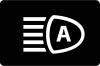
Automatic high-beam indicator
Headlamp with A — automatic high-beam control.This symbol refers to automatic high-beam operation or readiness, depending on its display state. It differs from the blue indicator that confirms main beams are actually illuminated. Check the handbook’s description for the cluster fitted.We should override the system whenever its choice is unsuitable. Curves, poor visibility, signs and other traffic can affect detection. Keep the relevant camera area clear, and do not assume the automatic feature always recognizes every situation in which dipped beams are needed.
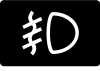
Front fog lamps
Fog-lamp symbol — front fog lights selected.This indicator confirms operation of the front fog lamps where fitted. It is not an engine or cooling-system warning. Use fog lighting only when appropriate for the conditions and local requirements.The front and rear fog indications are different, and not every market has the same lighting equipment. Turn unnecessary fog lights off when visibility improves. If a lamp fails to illuminate despite the selected setting, check the lighting message and have the exterior lamp inspected safely.
Exterior lamps on
Lamp symbol — exterior lighting selected.The lamps-on indicator shows a lighting state, such as selected exterior lamps, according to the Ranger’s lighting system. It should not be used as the sole check that the correct lights are operating for darkness or poor visibility.Confirm the control position and actual headlamp operation. Daytime running lamps and an illuminated dashboard do not necessarily mean the full nighttime lighting setup is active. If automatic lighting behaves unexpectedly, select the appropriate manual setting and arrange inspection when needed.
What to do when several Ranger warnings appear together
Start with the warning that most affects safety. Oil pressure, overheating and abnormal braking take priority over a disabled convenience feature. One fault can make several dependent systems unavailable, so multiple icons do not necessarily mean that every component has failed.
Maintain control and stop safely when the warning, symptoms or message requires it.
Record the exact messages and which lamps are steady or flashing.
Note the circumstances: towing, off-road use, refueling, tire changes or recent repairs.
Check only items that are safe and appropriate to inspect.
Arrange diagnosis or roadside assistance before continuing with a serious unresolved warning.
Preserve diagnostic information rather than clearing codes immediately. Disconnecting the battery may erase useful evidence without fixing anything. Transmission-temperature or 4WD-overheating messages also deserve attention even if there is no matching icon in this guide. Follow their cooling or stopping instructions exactly, especially after heavy towing or demanding off-road use.
Ford Ranger dashboard symbols make more sense when we separate faults from normal status indicators. An oil-pressure warning requires a different response from 4H selection, and a diesel regeneration message is different from a water-in-fuel alert. Read the full message, match it to the correct engine and equipment, and use the vehicle’s handbook for the required action. Persistent warnings need diagnosis rather than a reset that only removes the display.
Frequently asked questions
1. What does the wrench light mean on a Ford Ranger?
It can indicate a powertrain or four-wheel-drive fault. It is not simply an oil-service reminder. Read the message and arrange diagnosis; if it appears with the check engine light, follow the instruction to stop safely and obtain assistance.
2. Can we drive with the Ranger check engine light on?
A steady lamp with normal operation calls for prompt diagnosis. Flashing, severe rough running, major power loss or additional urgent warnings require a more immediate response. Reduce load and stop safely when symptoms or instructions make continued driving unsafe.
3. Does the 4H light mean the four-wheel-drive system has a fault?
Usually it confirms that four-wheel-drive high range is selected. A steady indicator confirms completed selection on the covered system. A pending shift or separate malfunction message needs its own response. Use 4H only on surfaces permitted by the handbook.
4. Why is the AdBlue warning still on after refilling?
The message may concern a system fault rather than a low level, or the refill may not yet satisfy the vehicle’s recognition conditions. Check the specified refill procedure and quantity for that Ranger. Do not ignore a remaining countdown or repeatedly add fluid without understanding the message.
First identify and correct the cause. Some indicators clear when normal conditions return; others require diagnosis or a specific reset after service. A maintenance reset is not a repair for engine, brake, airbag or drivetrain faults. Avoid erasing codes before they have been recorded.


 Ford Ranger Payload: How Much Weight Can It Carry?

















 Ford Everest Dashboard Symbols: Warning Lights and Meanings
Leave a Reply